
Local SEO for Retail Stores in San Francisco: How Boutiques Get Found on Google
Short answer: local SEO for retail stores starts with a Google Business Profile, formerly known as Google My Business, that matches your real shop. Use the name on your storefront, the most specific category, correct holiday and peak-season hours, and the address where local customers walk in. Then add real photos, eligible in-store products, honest online reviews and a matching website. This local SEO guide for San Francisco small businesses with a physical store follows Google’s rules, with no ranking promises. For the bigger picture, see our local SEO services in San Francisco.
Local SEO for Retail Stores: How Shoppers Find Brick-and-Mortar Businesses
Say someone in the Mission does an online search for local gift shops on a phone, and Google tries to show nearby businesses they’d like to visit. In Google’s tips for local ranking, three things weigh most on local results. Relevance is whether your profile fits the words typed to get search results; distance is how far your door sits from the shopper. Popularity, which the page’s heading calls prominence, is how well known you are, and Google counts links from other websites and your number of reviews toward it. Google is also clear that nobody can request or pay for a better local search ranking, so no one can pay to rank higher in local search.
Your address won’t change, but local SEO helps the search engine learn what you sell, where you are and when you open. Complete, correct details raise the odds that your profile will appear in local search, Google notes. That is the goal of local SEO: an online presence and visibility in local search results built on true business information. Our map pack guide explains the local pack, the Google local block in search engine results.
Set Up Your Google Business Profile the Right Way
Google describes the platform as one place to manage business listings on Google Search and Google Maps so people close by can discover you. Our Google Business Profile for local businesses guide covers setup. What follows matters to any shop owner or business owner, per Google’s guidelines for representing your business.

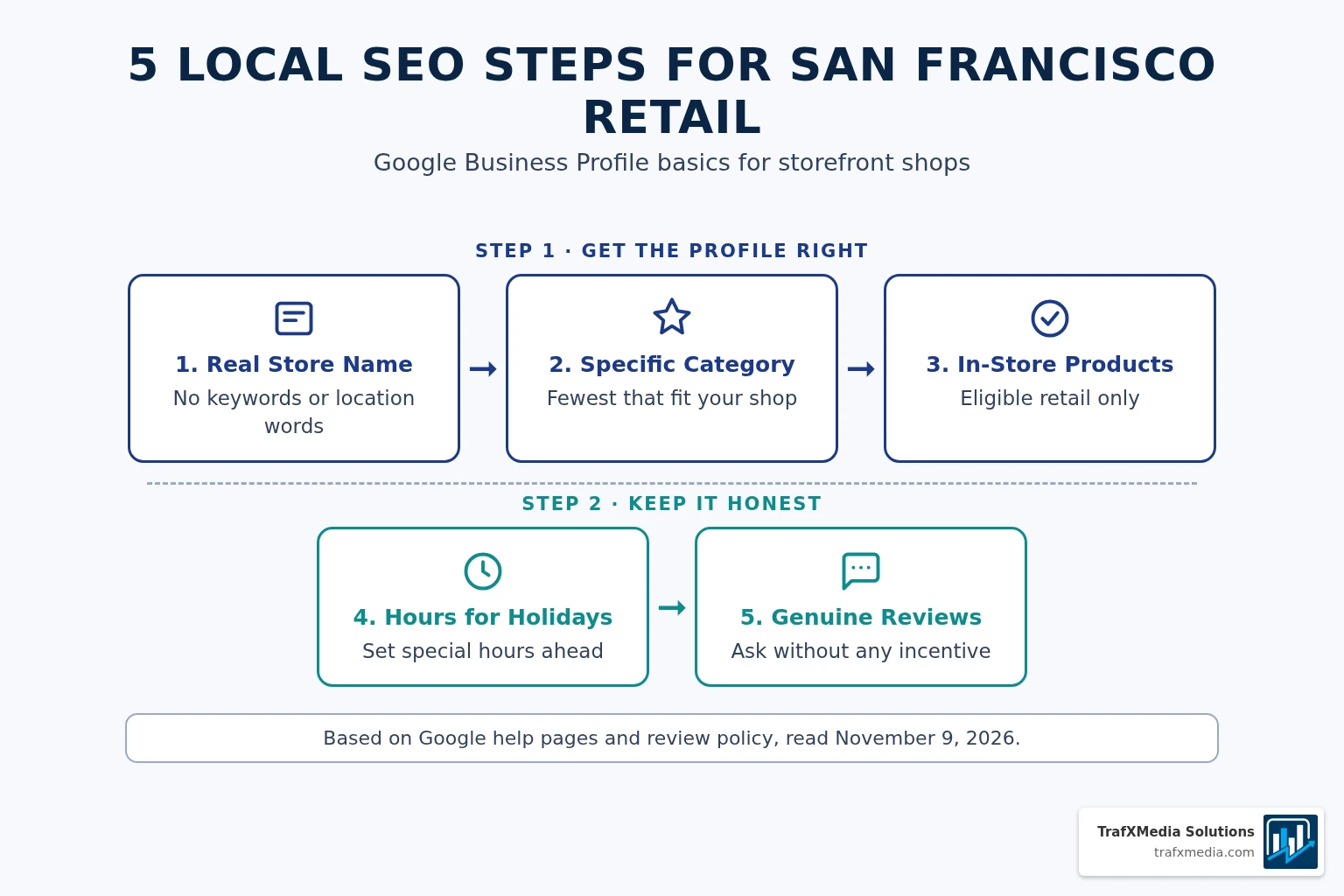
Name Your Profile Exactly Like Your Shop Sign
Look at your awning, your shopping bags and your website header. Google ties the profile name to that real-world name and warns that tacked-on words can get a profile suspended. Leave off “boutique” or “San Francisco” unless they are on your sign. Save any local keyword for your website.
Start With the Narrowest Category That Fits
For categories, Google wants the smallest set that covers your core business, each as precise as possible, none picked just to catch a search term. Pick the narrowest option that fits the main product or service you sell.
Point Calls and Clicks Straight to Your Store
Tap the number or website on your business listing, and a shopper should land at this shop. Google favors a local line over a central call center when possible, and it bans numbers or links that send people somewhere other than your business, social media pages included. That covers every platform you link.
Holiday Hours and Busy Shopping Days for Your Shop
Special hours change a single day while your usual week stays put. Here are upcoming dates from Google’s US holiday list, read November 9, 2026:
- Thanksgiving: November 26, 2026
- Black Friday: November 27, 2026
- Christmas Eve: December 24, 2026
- Christmas: December 25, 2026
- New Year’s Eve: December 31, 2026
- New Year’s Day: January 1, 2027
Our holiday hours guide shows the steps.
Cyber Monday falls on November 30, 2026, a Monday, and is your shop’s own busy date. Opening early or closing to restock? Add special hours. Accurate hours are simple local SEO work.
- Length: one entry stretches across at most 6 straight days, closed or with shifted times.
- Setting: with hours set to “Open with main hours,” your special entries appear; otherwise they stay hidden.
- Timing: edits pass a Google review before going live, so make them early.
Show Your Physical Store Address and Signage
If customers can walk in, list the street address. Google expects a shop that shows its address to have a permanent sign with its name there. Give the search engine a precise address, with links and keywords kept out of the address fields.
A rented mailbox you never work from, a virtual office, does not qualify. Each location gets one profile. If you also deliver, a hybrid business may list both the storefront and a service area while staff are on site to serve walk-ins during posted hours. Our service area business guide has more.
Photos and In-Store Products That Match Your Retail Business
Google sees photos and videos as a way to show what you carry and tell your shop’s story. For honest local SEO, show your window display, the folded scarves by the register and the products you really stock, never stock pictures.
Only retail shops can show in-store products. A quick eligibility check:
- Who can use it: retail businesses in four eligible countries, the US, Canada, the UK and Ireland.
- Rules: each item you list has to pass Google’s Shopping Ads Policy.
- Not allowed: regulated goods and services. Google names alcohol, tobacco, gambling, financial services, pharmaceuticals and unapproved supplements, and health or medical devices.
- Risk: one item that breaks the policy can cost you the whole catalog, compliant items included.
Listed items might surface in local search results, Google says, letting a shopper check what you have on the shelf. That helps local shoppers, but it is no promise of higher SEO rankings or sales.
Online Reviews for Retail Stores: What Google Allows
Read Google’s prohibited and restricted content policy before your team asks for reviews. Our Google reviews strategy post covers local SEO and reputation management. Google’s tips page says replies show you value feedback and that positive reviews and helpful replies help a business stand out, so respond to reviews.
- A coupon, a free tote, cash or any other perk can’t be traded for a review, or for taking a bad one down.
- Shoppers who had a poor visit must not be steered away, and you can’t invite only the happy ones.
- A friendly ask is fine, as long as nobody is pushed at the register or told what to write.
Website Pages and Listings That Match Your Store: Local SEO Tips
Optimizing your website for local search means the search engine finds the same facts on your site as on your profile, with name, address and hours on a clear contact page. Two shops? Build two real pages, never one template with the neighborhood swapped. Our neighborhood pages guide shows honest local content, and a page on local events your shop really hosts fits too.
Local business listings in local directories and on any other platform should match as well. Our local citations checklist keeps mentions of your business consistent. On the markup side, Google’s LocalBusiness structured data documentation marks name and address as required and points you to the narrowest subtype available. Our local business schema post goes further. If you also run an online store, keep its details the same. See also our local SEO for florists post.
Local SEO for Retail Stores: Mistakes to Avoid
Local SEO for retail stores is an ongoing process, and no paid SEO tools are needed for these checks. Effective local SEO strategies avoid:
- A listing name padded with keywords or neighborhood names.
- A stack of categories chosen as search terms.
- Holiday closures or late nights missing from your hours.
- A virtual office, or an address or service area you don’t use.
- A forwarding number or redirect link on the listing.
- Coupons or gifts handed out for reviews.
- Stock images posing as your store.
- Products that break the Shopping Ads Policy, or regulated goods.
Frequently Asked Questions
Should My Profile Name Include “Boutique,” “Retail,” or “San Francisco”?
Only if your sign, website and printed materials already use that name. Padding it breaks Google’s rules and risks suspension.
What Category Fits a Retail Store Best?
Scroll your profile’s category list for the closest match to what you mostly sell. Keep it short, with no category added only as a keyword.
Can My Shop List In-Store Products on Its Business Profile?
Yes. The US is an eligible country, but products must meet the Shopping Ads Policy, and regulated goods like alcohol are barred.
Should My Store Set Special Hours for Black Friday and Christmas?
Black Friday, Friday, November 27, 2026, and Christmas, December 25, 2026, both appear on Google’s US holiday list. Google recommends confirming hours on official holidays.
Can a Shop Trade a Coupon for a Google Review?
No. Google’s policy rules out payment, discounts and free goods offered for reviews. Just ask for honest feedback with nothing attached.
Want a second look at your store’s SEO strategy? TrafXMedia Solutions can help. Reach us through our contact page.