Local Business Schema: A Plain Guide for San Francisco Small Business Websites
Local business schema is a small block of code that tells Google the plain facts about your business: its name, address, phone number, opening hours, and website. For a San Francisco shop, clinic, or trade, it is one of the simplest technical tasks on a small business site. This guide explains what the markup is, which fields Google uses, how to add it in WordPress, and how to test it, without hype.
What Local Business Schema Is (and What It Is Not)
Structured Data and Schema Markup in One Paragraph
Structured data is a standard format that can help search engines read the details of a page without guessing. The shared vocabulary lives at schema.org, and Google recommends writing it as JSON-LD, a short script that sits in the page code and does not change the visible page. A Mission bike shop with a door customers walk through is exactly the physical location the LocalBusiness schema type describes. Google’s introduction to structured data covers the basics if you want more background.
A Name Tag for Google, Not a Ranking Boost
Like the sign on a bike shop window, the markup says who is inside but pulls no one through the door. Google’s LocalBusiness documentation frames it as a way to hand over business details like hours or a separate parts counter, and it promises no special feature in search results. When Google retired several structured data types in June 2025, it said the change would not affect how pages are ranked. Treat the markup as accurate housekeeping that supports the rest of your local SEO work in San Francisco and your local search basics, not as a shortcut.
Which LocalBusiness Schema Fields Google Reads
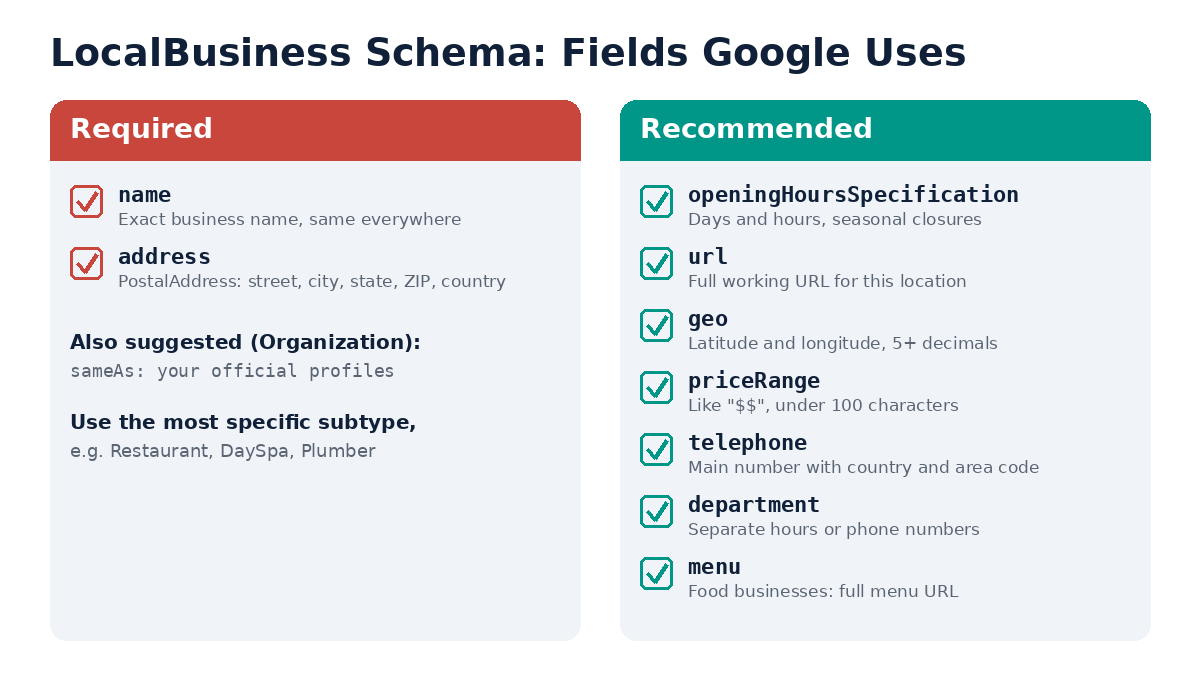
The Two Must-Haves: Business Name and Address
Google insists on just name and address. The address goes inside a PostalAddress object with street, city, state, ZIP code, and country. Fill in every part, not just the city. The business name and address in your code should read letter for letter like your listing on Google Maps and your local citations.
Nice-to-Haves: Opening Hours, URL, Geo, Price Range, Telephone
These optional extras round out your business information:
- openingHoursSpecification: opening hours per weekday; a winter shutdown can carry its own validFrom and validThrough dates.
- url: the working page for this one business location.
- geo: coordinates with five or more digits after the decimal point.
- priceRange: something like “$$” or “$10-15”, under 100 characters.
- telephone: full international form, so a San Francisco number starts +1-415.
- department: for a part of the shop with its own hours or line, like a rental desk.
- menu: for cafes and food spots only.
LocalBusiness sits under Organization in schema.org, so organization markup properties can ride along, most often sameAs, which links to the shop’s own profiles.
Pick the Narrowest Type of Business
Google’s advice is to use the most specific business type that fits: a bike shop picks BicycleStore instead of plain LocalBusiness. A shop doing two jobs can name both in an array, for example ["Electrician", "Plumber"]. Google does not read additionalType, so skip it. With multiple locations, such as a second shop in the Sunset, give each specific business its own separate LocalBusiness markup on its own location page.
A Simple Schema Markup Code Example for a San Francisco Business
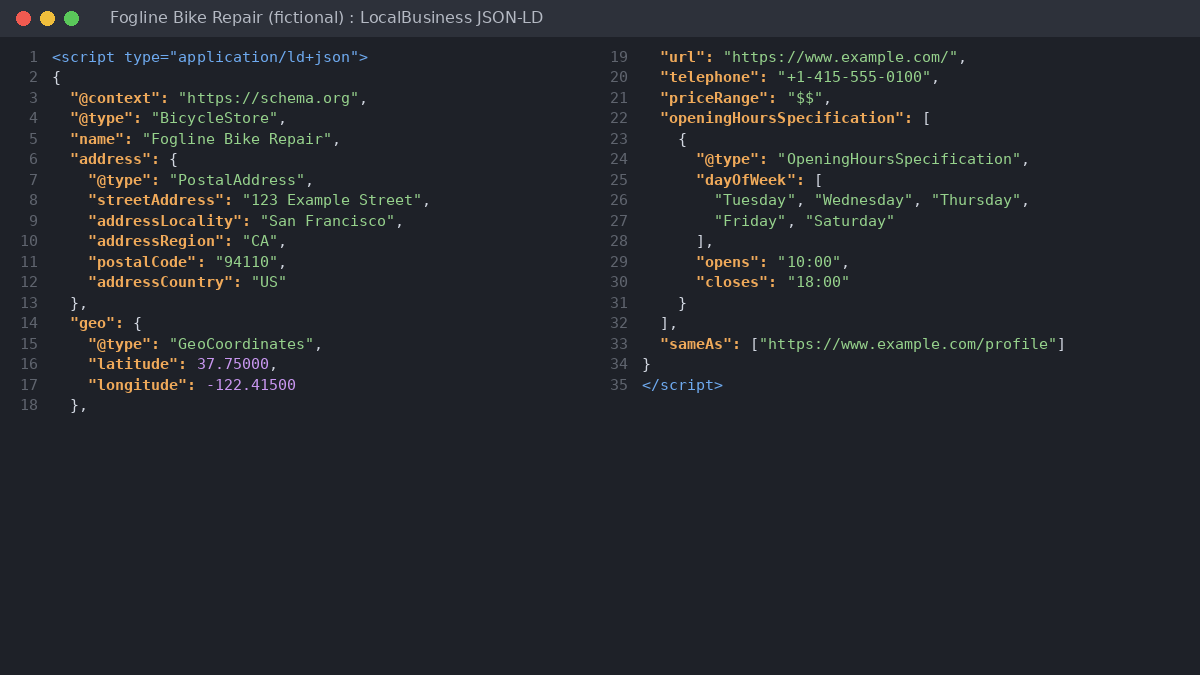
Here is LocalBusiness markup for a fictional bike repair shop. The name, address, and 555 phone number are placeholders, not a real business.
<script type="application/ld+json">
{
  "@context": "https://schema.org",
  "@type": "BicycleStore",
  "name": "Fogline Bike Repair",
  "address": {
    "@type": "PostalAddress",
    "streetAddress": "123 Example Street",
    "addressLocality": "San Francisco",
    "addressRegion": "CA",
    "postalCode": "94110",
    "addressCountry": "US"
  },
  "geo": {
    "@type": "GeoCoordinates",
    "latitude": 37.75000,
    "longitude": -122.41500
  },
  "url": "https://www.example.com/",
  "telephone": "+1-415-555-0100",
  "priceRange": "$$",
  "openingHoursSpecification": [
    {
      "@type": "OpeningHoursSpecification",
      "dayOfWeek": ["Tuesday", "Wednesday", "Thursday", "Friday", "Saturday"],
      "opens": "10:00",
      "closes": "18:00"
    }
  ],
  "sameAs": ["https://www.example.com/profile"]
}
</script>
What Each Part of the Bike Shop Code Does
@context says the vocabulary comes from schema.org. @type picks a specific subtype, here BicycleStore. Fogline’s name and PostalAddress meet the must-have list. In geo, 37.75000 and -122.41500 each carry five decimals. The phone opens with +1, then 415. The hours array covers Tuesday to Saturday, 10:00 to 18:00, so Sunday and Monday read as closed. sameAs points to official profiles. Every value should match the visible page content.
How to Add LocalBusiness Markup on a WordPress Site
Plugin vs Hand-Coded JSON-LD
When implementing structured data, Google’s own guidance says that if you use a CMS, a plugin built for it may be the easier route. On a site like Fogline’s, an SEO plugin’s local settings or a free schema generator can draft the block in minutes; compare it with Google’s property list and run a tester before launch. To own every line, add your own script through a snippets tool. Pick one route: a plugin block plus a hand-pasted one leaves two schema markups that may disagree.
Choose a Home Page, Contact Page, or Landing Page
The code can live on any URL, but use LocalBusiness markup where the page is about the shop: the home page, contact page, or a branch landing page, not a blog post on fixing a flat. If you write neighborhood pages for Bernal Heights or Noe Valley, the code should still carry the shop’s real Mission address.
How to Check Your Structured Data Markup Works
Running the Rich Results Test
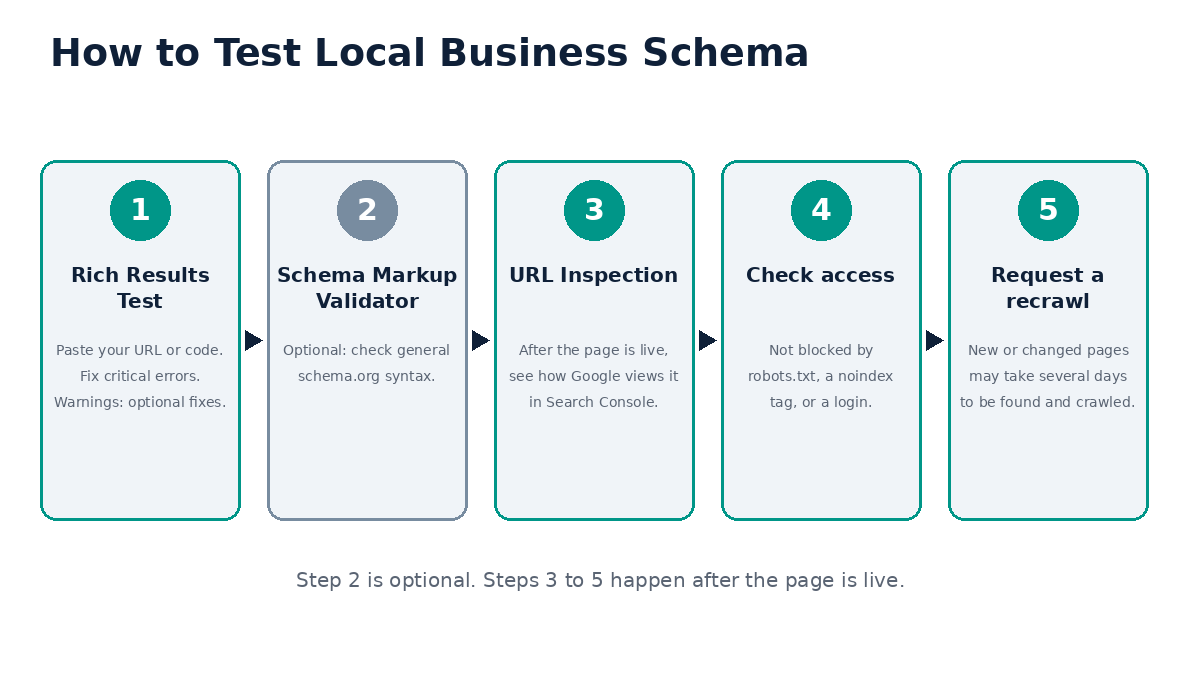
Run the shop’s URL or raw script through Google’s tester and clear any critical error first. Google says fixing non-critical warnings can improve the quality of your markup, though it is not needed for rich result eligibility. For a second opinion beyond Google’s features, schema.org’s own markup validator checks the full vocabulary.
Checking the Live Page in Google Search Console
Once Fogline’s page is live, run URL Inspection in Google Search Console to see the version Google fetched. A robots.txt rule, a noindex tag, or a login wall can quietly block it. With those cleared, ask for a recrawl; Google says finding and crawling a new or edited page can take several days.
Mistakes to Avoid
Self-Serving Review Stars
Google recommends aggregateRating and review only for sites that collect reviews about other local businesses. Do not mark up reviews of your own business. Under Google’s structured data guidelines, this markup can lead to a manual action, which removes the page’s eligibility for rich results.
Markup That Does Not Match Your Google Business Profile
Your schema should match the page and your Google Business Profile: same name, address, phone, and hours. If Fogline adds Monday hours or moves, change the page, code, and profile together. Consistent details help customers, whether they find you in the Map Pack or on your site.
Showing an Address You Keep Hidden on Google
Google lets a local service business that visits customers hide its address and set service areas on its Business Profile. A mobile bike mechanic who hides a home garage address on Google should not print it in the page code. Since address is a must-have, that business should weigh whether full markup fits at all. That setup is walked through in our service area business local SEO guide.
Common Questions
In plain terms, what is local business schema?
It is structured data, usually JSON-LD, that describes a business’s name, address, hours, and contact details in a format Google and other search engines can read.
Will adding LocalBusiness schema lift my rankings?
Google does not promise any ranking effect or rich result from it. Add it so Google has correct facts about your shop, and leave it at that.
Can I trust the code a schema generator gives me?
Yes, as long as you check the output against Google’s documentation and test it before publishing.
What if I run more than one shop?
Write a fresh block for every branch, so a Mission shop and a Sunset shop each carry their own street, phone line, and hours, ideally each on its own page.
Not sure your site’s local business schema matches your Business Profile? Contact TrafXMedia for a Local SEO review.