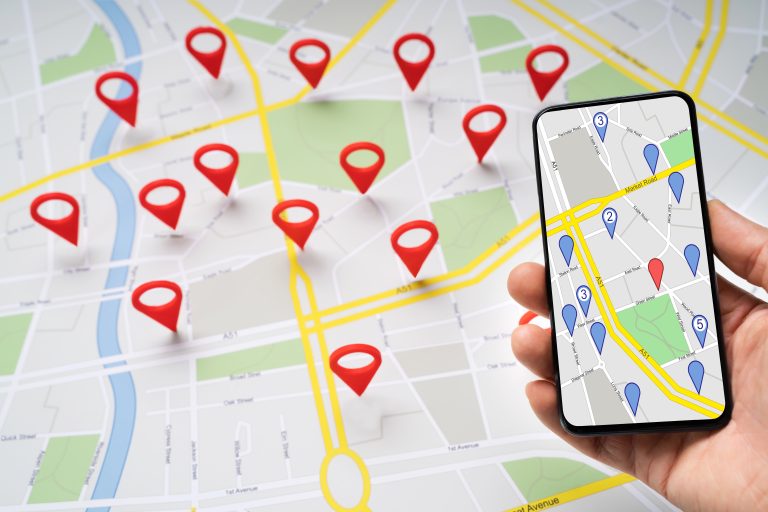

Claim the Map: Google Business Profile for Local Businesses
Why Google Business Profile Matters for Local Growth
When someone on Mission Street searches “coffee near me,” or a homeowner in Oakland types “plumber open now,” Google rarely sends them on a long research journey. They glance at the map pack, skim a few photos and star ratings, check hours, and decide. That shortlist lives inside Google Business Profile — the free listing that powers your presence across Google Search and Google Maps.
A strong Profile is not a vanity badge. It is the storefront people see before they ever open your website. For San Francisco and Bay Area owners — from SoMa studios to Peninsula clinics — it decides whether you show up when nearby customers are ready to call, get directions, or book. Looking credible on the map is how you earn the click that makes the rest of your marketing worth doing.
Key Benefits of a well-run Profile:
- Appear in the local pack and on Maps when people look for your category nearby
- Turn discovery into calls, direction requests, and website visits with clear hours and CTAs
- Build trust through photos, reviews, Q&A, and up-to-date details
- Compete with bigger brands by looking credible and convenient on mobile
- Learn what customers actually type using Profile Insights, then improve what you show
I’ve helped brands large and small turn local visibility into real inquiries. The pattern is consistent: complete the listing honestly, keep it fresh, respond like a human, and treat Maps as a channel you manage — not a set-and-forget sticker on the door.
Think of the Profile as the handshake before the website conversation. Someone comparing three dentists in the Sunset or three caterers for a SoMa office lunch will open Maps first. If your hours are wrong, your photos look generic, or your last review reply is two years old, they move on — even if your site is beautiful. Getting the listing right is how you stay in that shortlist when distance and reputation are otherwise close.
Key terms / helpful reading: If you’re building a broader local search plan, start with our guide to local SEO for small business, dig into local business ads when paid and organic need to work together, and keep messaging sharp with San Francisco content marketing ideas that match how Bay Area customers talk.

Set Up and Claim Your Profile the Right Way
Getting listed is easy. Getting listed *correctly* — under the right name, category, and location rules — is what keeps your Google Business Profile eligible for the map pack. Rush this step and you spend months fixing duplicates, suspended Profiles, or mismatched NAP (name, address, phone) across the web.
Create or claim the listing
Search Google for your exact business name plus city. If a listing already exists, request ownership and complete verification. If nothing accurate exists, create a new Profile with the legal or publicly used name — not a stuffed title like “Best SF Roofer Cheap Roof Repair.”
Use the name customers recognize on your sign, invoices, and website. Google’s guidelines are clear: the Profile title should match the real-world brand, not a marketing slogan packed with cities and services.
Verify your business profile with a method Google accepts
Verification proves you control the location. Common options include postcard to the street address, phone, email, or video — availability depends on category and location type. Service-area operators (you go to the customer) follow different address rules than storefronts; don’t invent a virtual office just to pin yourself on a map.
Finish verification before you pour energy into posts and photos. An unverified Profile is a draft that may never earn stable visibility. If a postcard is delayed — common with shared mailrooms in older SF buildings — track the request status and escalate with Google’s support tools rather than creating a second listing in frustration.
For multi-location operators, assign ownership carefully. Give editors access only to people who will keep hours and posts accurate. Too many cooks create conflicting edits; too few and the Profile goes stale when one person leaves the company.
Nail the core fields first
Before creative extras, lock in:
- Primary phone that humans answer (or a tracked local number you monitor daily)
- Website URL to your best landing page for nearby visitors — usually homepage or a clear services page
- Hours, including special hours for holidays and SF street-fair weekends when you close early
- Business address or service area that matches how you actually operate
- Appointment / messaging settings only if you will respond promptly
Inconsistent hours between your door, website, and Profile are one of the fastest ways to lose credibility — and a common reason Bay Area customers bounce to the next pin on the map.
Double-check that your website footer, contact page, and Profile show the same phone and address format. Small differences — “Street” vs “St,” suite numbers missing, an old 415 line that forwards nowhere — look minor to you and suspicious to both customers and algorithms. Clean NAP everywhere you control, then keep a short changelog when details update. Accurate information across those surfaces is quieter than ads, but it decides whether someone trusts the pin enough to tap Call.
How to Optimize for the Local Pack: Categories, Services, Description, and Attributes
Once Google Business Profile is claimed, how you optimize is less about “tricks” and more about clarity. Google’s local results weigh relevance, distance, and prominence. Your job is to make relevance obvious and prominence credible so you can compete for local search results without sounding robotic.
Choose business categories that match what you sell
Your primary category is the strongest relevance signal. A Mission District yoga studio should lead with “Yoga studio,” not a vague “Health.” Add secondary categories only when they truly describe what you offer — “Physical therapist” for a clinic that also does rehab, for example — not every adjacent label you wish you ranked for.
Wrong categories confuse Google and customers. Review them quarterly as you add or retire services. If you recently expanded from residential cleaning into office cleaning across the Peninsula, reflect that with a secondary category and clear service lines — don’t hope Google “figures it out” from an old blurb.
When two categories feel equally primary, pick the one that drives the most revenue or the most competitive “near me” demand, then support the rest with services and content. Clarity beats covering every possible label.
Write services and a description humans will finish reading
Services should map to real offerings with plain names: “Residential HVAC repair,” “Same-day lockout service,” “Bridal hair and makeup.” Where Google allows service descriptions or price ranges, be honest. Inflated menus of services you don’t deliver create bad reviews later.
The business description is your elevator pitch. Lead with who you help, what you do, and where you work. Mention neighborhoods naturally when it’s true — “Serving the Marina, Pac Heights, and nearby Peninsula cities” — without stuffing every ZIP code into one paragraph. Keep the tone conversational; this is not a press release.
Write for a tired person on a phone. Lead with the outcome (“same-week appointments,” “family-owned since 1998,” “licensed and insured for East Bay homes”), then support with a sentence of proof. Save long brand stories for your About page. On the Profile, every line should help someone decide whether to tap Call or Directions.
Use hours, attributes, and products where they help
Attributes (women-owned, wheelchair accessible, outdoor seating, LGBTQ+ friendly, and dozens more) help filters and set expectations. Fill the ones that apply. Skip ones that don’t.
If you sell defined products or packages, Products and Services modules can showcase offerings with photos and prices. A Hayes Valley boutique or a South Bay salon can turn browsers into booked clients by making the next step obvious without forcing a website hunt.
Photos and Posts: proof you are real and open
Profiles with original photos earn more engagement than text-only shells. Prioritize:
- Exterior and entrance (so people recognize the storefront from Geary or Valencia)
- Interior and team (faces beat stock)
- Workmanship or product close-ups
- Before/after where appropriate and permitted
- Logo and cover that match your brand site
Shoot on a phone if you must — authenticity beats glossy stock of a city you don’t serve. Refresh images when you remodel, rebrand, or change seasonal displays.
Google Posts act like lightweight updates across Search & Maps surfaces. Use them for a seasonal promotion, events, new products, hiring, or helpful tips — then link to a page that converts. A weekly or biweekly cadence is enough for most shops; daily spam posts help no one. Think “useful bulletin board,” not “social media dump.”
A practical rhythm for many Bay Area shops: one Post for a monthly offer or seasonal reminder, one for a short tip that builds expertise, and occasional event or hiring notes when relevant. Always send the click to a page that matches the promise — if the Post says “fall gutter cleaning,” land on that service page, not a generic homepage. Consistency here keeps your listing feeling alive when someone compares you to the quiet competitor next door.
Reviews, Q&A, and Trust Signals That Win the Click
Stars alone don’t tell the whole story on a Google Business Profile. Shoppers read recent reviews, skim owner replies, and peek at Questions & Answers. In competitive SF corridors — think restaurants near Union Square or contractors serving the East Bay — trust signals often decide the winner between two otherwise similar pins in the search results.
Build an ethical review habit
Ask for customer reviews after a successful job, appointment, or purchase — when the person is genuinely happy. Send a direct link to your Profile. Train staff to request honest feedback, not a specific star rating. Never gate reviews (“leave 5 stars for a discount”) or suppress negative experiences; that violates Google’s policies and backfires when screenshots circulate.
Volume and recency both matter. Ten thoughtful notes from the last quarter often look healthier than eighty glowing lines from three years ago and silence since. Google reviews that mention real details — a technician’s name, a dish, a wait time you improved — also help future shoppers picture the experience.
Make the ask part of your delivery checklist. After install, checkout, or appointment, a simple text or email with a Profile link outperforms a vague “leave us a review somewhere.” For teams with high volume — salons, clinics, restaurants — rotate who owns follow-ups so the habit survives busy weeks and staff turnover.
Respond like a local owner, not a template bot
Thank people for specifics. For criticism, acknowledge the issue, avoid arguing in public, and move the conversation offline with a phone or email. Future customers read your replies as much as the original review — calm professionalism travels far on Maps.
Own your Q&A section
Anyone can add questions to a Profile. Monitor them. Seed accurate FAQs yourself: parking near the Ferry Building location, whether you serve San Mateo, insurance accepted, typical response time. Correct wrong answers politely and quickly. An unanswered “Are you open on Sundays?” at 10 p.m. is a lost Saturday booking.
Photos, review velocity, response quality, and clean business info compound. That prominence helps when distance between you and a competitor is similar — common across dense neighborhoods from the Richmond to Oakland’s Rockridge.
Also flag and report fake or abusive reviews through Google’s tools when they clearly violate policies. You won’t win every dispute, but documenting patterns protects your team’s morale and keeps the public record closer to reality. Pair that with offline service recovery: the best “review strategy” is still fixing the issue that caused the complaint.
Measure What Works with Insights — Then Iterate
A Profile without measurement is a billboard you never look at. Google Business Profile Insights (and related performance views in the Business Profile manager) show how people find you and what they do next — including how your business on Google earns calls, directions, and website clicks.
Read the discovery vs. direct split
Insights typically separate customers who searched for your brand from those who found you through category or discovery queries (“emergency dentist near me”). If discovery impressions rise after you improve categories, photos, and posts, keep investing there. If brand searches dominate, your reputation is strong — double down on conversion fields like messaging, booking links, and call tracking.
Watch actions, not vanity views alone
Calls, direction requests, website clicks, and message volume matter more than raw impressions. A Bernal Heights café might care most about direction requests on weekends; a B2B plumber serving commercial kitchens may care more about calls during weekday mornings. Align your Profile CTAs and hours messaging with the actions that pay the bills.
If website clicks are high but calls are low, check whether your phone number is prominent and whether mobile tap-to-call works. If directions spike but walk-ins disappoint, your pin or parking notes may be confusing — a short Q&A or Post about “garage on Oak, entrance on Fillmore” can save real-world friction. Insights tell you where people hesitate; your job is to remove the hesitation.
Run small experiments on a calendar
Change one meaningful thing at a time when you can: new primary photo, clarified services list, holiday hours, a Post series about a seasonal offer. Note the date in a simple spreadsheet. Review Insights monthly. Local results move slower than paid ads, so give signals a few weeks before you declare winners and losers.
Tie Profile data to your wider analytics when possible — Search Console queries, call logs, and CRM source fields. The goal is a feedback loop: Maps teaches you what people want; your website and service pages answer it better; your Profile stays the accurate front door.
Common Mistakes That Quietly Hurt Your Profile
Even careful owners slip into habits that quietly hurt visibility or trust. Fixing these is often worth more than chasing a new tactic. Use this section as a quarterly audit list — fifteen minutes with a checklist beats another year of silent underperformance.
Stuffing the title with every service
Adding “Best,” city names, and every service into the title invites suspension or forced edits. Use the real business name. Put a natural keyword in categories, services, description, and posts instead — never in the title as a pile of phrases.
Duplicate or abandoned listings
Mergers, rebrands, and old addresses spawn duplicates that split reviews and confuse Google. Request consolidations, mark closed locations correctly, and keep NAP identical on your site and major directories.
Ignoring hours, phone, and “temporarily closed”
Nothing erodes credibility like driving across town to a locked door Google said was open. Update special hours for holidays, construction, and pop-up closures. If you change phone systems, update the Profile the same day.
Fake engagement and review schemes
Buying reviews, coordinating fake Q&A, or posting misleading photos risks removal and lasting damage. Earn signals the slow way.
Set-and-forget after the first setup
Competitors refresh photos, reply to reviews, and publish posts. A Profile last touched in 2022 looks abandoned — and often performs like one. Assign an owner or VA a monthly checklist: hours, photos, review replies, Insights skim, spam flagging.
A lightweight monthly pass might include: confirm hours and holiday overrides, reply to any open reviews or questions, upload two to four new photos if you have them, publish one useful Post, skim Insights for odd drops, and search your brand on Maps from a phone to see what customers see. That habit alone separates maintained Profiles from abandoned ones.
Avoid these traps and the work you put in to optimize the listing has room to matter.
Frequently Asked Questions about Google Business Profile
How long does it take for Profile changes to show in the local pack?
Some edits — hours, photos, posts — can appear quickly. Stronger ranking movement in the map pack usually takes weeks of consistent relevance and prominence signals, not overnight swaps. Verification delays, category changes, and review velocity all influence timing. Treat the Profile as an ongoing channel. If you make a big change (new primary category, rebrand, address move), expect a period of turbulence while Google reassesses the listing — plan marketing around that, not against it.
Do I need a physical address to use the Profile?
Storefronts use a public address. Many service-area operators can hide the address and set a service area instead, following Google’s rules for their category. Don’t use a virtual mailbox or unrelated coworking desk to fake a pin; that risks suspension and angry customers who show up to the wrong place. When in doubt, follow Google’s current help documentation for your type of company, and mirror the same service-area story on your website so customers aren’t surprised.
Should every location get its own Profile?
Yes when each location is a real, staffed place customers can visit (or a clearly defined service hub under Google’s multi-location rules). Don’t create fake locations to cover more map pins. For multi-location Bay Area brands, keep naming and categories consistent while letting each Profile reflect that site’s hours, photos, and reviews.
Can the Profile replace my website?
No. The Profile wins discovery and quick actions; your website closes complex sales, tells your story, hosts detailed service pages, and supports broader SEO. The best setups use both — Profile as the map storefront, site as the full experience — with matching NAP and clear next steps. Showing up in search and maps gets the first tap; the site earns the project.
What should I do if my Profile is suspended or edited by Google?
Read the notice carefully, fix guideline violations (name, categories, address misuse, fake engagement), and request reinstatement through the official flow. Avoid creating a second Profile as a workaround; duplicates make recovery harder. Document your real-world proof (licenses, storefront photos, utility bills) before you appeal.
Conclusion: Claim the Map, Then Keep Showing Up
Google Business Profile is the front line of how a local business gets found nearby. Claim and verify it correctly. Choose categories and services that match reality. Write a clear description, keep hours honest, and show original photos of the place people will actually visit. Earn and answer reviews. Watch Insights. Fix the habits that stall otherwise good companies.
In San Francisco and across the Bay Area, customers decide fast — often from a phone on Muni or a sidewalk outside your competitor. Looking accurate, active, and trustworthy on Maps is no longer optional; it is how nearby demand finds you. The companies that win locally rarely have secret categories — they simply keep the listing complete, human, and current while competitors let it drift.
If you want a partner to connect Profile work with site SEO, content, and measurement — rather than treating Maps as an isolated checkbox — explore SEO service in San Francisco with TrafXMedia Solutions. We’ll help you get found nearby, then turn those map views into calls and customers you can keep.
Ready when you are: claim the listing, complete the details, and treat your Profile like the digital storefront it already is.