

Demystifying Your Google Ads Account Review
That Dreaded “Under Review” Notification: A Complete Guide
It’s a moment every digital advertiser knows and dreads. You’ve just launched a critical campaign—the culmination of weeks of strategy, copywriting, and design. You hit “publish,” lean back, and wait for the data to roll in. But instead of conversions, you see two words in your dashboard that bring everything to a screeching halt: “Under review.” Suddenly, your ads are offline, your lead flow has vanished, and a wave of uncertainty washes over you. What went wrong? How long will this last? Is my entire account at risk?
This is the reality of the Google ads account review, a standard but often stressful process where Google’s automated systems and human experts examine your ads, keywords, landing pages, and account settings. While it can feel like an arbitrary penalty, its purpose is to maintain the integrity of the world’s largest advertising platform. Google’s goal is to protect its users from scams, misinformation, and poor experiences, which in turn creates a more trustworthy and effective environment for legitimate businesses like yours. When users trust the ads they see, they are more likely to click and convert, benefiting everyone.
Understanding this process is not just about fixing a problem—it’s about mastering a core component of the Google Ads ecosystem. The review process is triggered by a variety of actions, most commonly the creation of new ads or significant edits to existing ones. It can also be initiated by changes to your billing information, potential security flags, or suspected policy violations. While most reviews are completed swiftly, typically within one business day, more complex cases can extend for several days, leaving you in a costly state of limbo. The outcome of a review can range from a full green light (“Eligible”) to a complete stop (“Disapproved”), with nuanced statuses like “Eligible (Limited)” in between.
Navigating this landscape can feel daunting, but the good news is that this process is predictable, manageable, and largely preventable once you understand its mechanics. You can move from a reactive state of anxiety to a proactive position of control, ensuring your campaigns launch on time and run without interruption.
I’m Richard Taylor, an SEO strategist and business consultant who has spent years in the trenches with businesses of all sizes, from nimble San Francisco startups to established enterprises, helping them master the Google Ads platform. I’ve seen how a stalled review can derail a product launch or how a misunderstanding of policy can lead to a devastating account suspension. This comprehensive guide is born from that experience. We will explain every aspect of the Google Ads review, from the initial triggers to the final outcomes, and provide you with the actionable strategies needed to build a resilient, trusted account that sails through reviews and drives consistent growth.
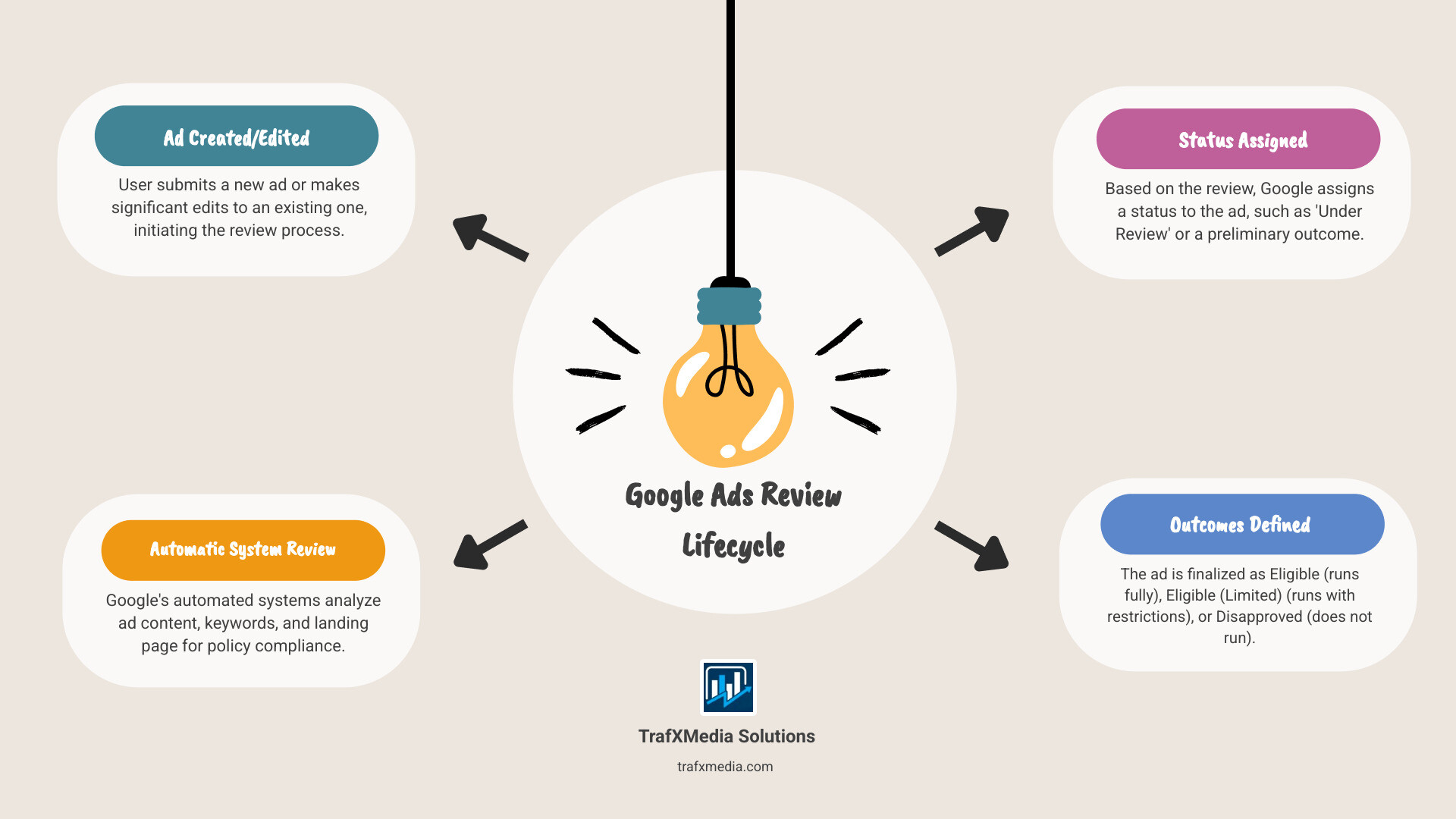
Google ads account review terms simplified:
- Google Ads for San Francisco businesses
- PPC management San Francisco
- Digital marketing San Francisco
What is a Google Ads Review and Why Does It Happen?
At its core, a Google ads account review is a mandatory quality control checkpoint. Every time you create or modify an ad, you are submitting it to Google’s gatekeepers—a sophisticated combination of artificial intelligence and human experts. This isn’t a punitive measure reserved for suspicious advertisers; it’s a universal process designed to uphold the quality and safety of the entire advertising ecosystem. Think of it as the digital equivalent of a building inspection: it ensures everything is up to code before the public is allowed inside.
Google’s reputation and business model depend on user trust. If users encounter deceptive ads, malware, or irrelevant content, they will stop clicking, which harms advertisers, diminishes Google’s credibility, and ultimately devalues the platform. The review process is the primary mechanism for preventing this erosion of trust. It serves three critical functions: enforcing advertising policies, ensuring account security, and maintaining a high-quality user experience.
The Three Pillars of a Google Ads Account Review
Google’s review process is built on three fundamental pillars, each addressing a different aspect of platform integrity.
1. Rigorous Policy Enforcement: This is the most prominent function of the review. Google maintains a vast and detailed set of advertising policies that govern what you can advertise and how you can advertise it. These policies are not arbitrary rules; they are designed to comply with laws and regulations across the globe and to protect users from harm. The review system carefully scans your ad copy, keywords, images, videos, and landing page for violations. Key policy areas include:
- Prohibited Content: This covers things that are outright banned, such as counterfeit goods, dangerous products (weapons, recreational drugs), and services that enable dishonest behavior (hacking services, fake documents).
- Prohibited Practices: This focuses on the how. It includes misrepresentation (scams, phishing, misleading claims like “get rich overnight”), abuse of the ad network (using cloaking or other techniques to hide your true landing page), and irresponsible data collection.
- Restricted Content: This category includes products and services that are legal but sensitive, requiring specific targeting restrictions or certifications. Examples include alcohol, gambling, healthcare and medicines, and financial services. Ads in these areas undergo much stricter scrutiny.
2. Proactive Security Checks: The review process also acts as a security system for your account and for Google. It helps detect and prevent fraudulent activity before it can cause significant damage. If an account is compromised, a malicious actor could run up huge ad bills on a stolen credit card or redirect your valuable traffic to a phishing site. Security checks are often triggered by unusual account behavior and may involve:
- Verifying Payment Information: Sudden changes to payment methods, large and unexpected budget increases, or payments from high-risk countries can trigger a review to confirm the activity is legitimate.
- Detecting Suspicious Logins: If your account is suddenly accessed from a different country or shows other unusual login patterns, Google may place it under review to protect it from being hijacked.
- Advertiser Verification Program: As part of a broader security push, Google requires many advertisers to complete a verification program to prove their identity and location. This helps prevent bad actors from hiding behind anonymous accounts.
3. Upholding Ad Quality and User Experience: A policy-compliant and secure ad is still a bad ad if it offers a poor experience. Google is deeply invested in ensuring that when a user clicks an ad, they land on a page that is relevant, useful, and easy to steer. The review process evaluates:
- Landing Page Relevance: Does the content on your landing page directly correspond to the promise made in your ad? An ad for “50% off running shoes” that leads to a generic homepage is a poor experience.
- Landing Page Functionality: The page must load quickly (adhering to Core Web Vitals), be mobile-friendly, and free of broken links, intrusive pop-ups, or malware.
- Transparency and Trust: Google expects landing pages to be transparent. This means providing clear contact information, a privacy policy, and being upfront about your business model.
Common Triggers That Initiate an Account Review
While reviews are standard, they are initiated by specific actions. Understanding these triggers allows you to anticipate reviews and build them into your workflow, minimizing downtime.
- Creating or Editing Ads and Assets: This is the most frequent trigger. Any change to an ad’s headline, description, URL, image, or even its associated extensions (sitelinks, callouts) will send it back into the review queue. Even pausing and re-enabling an ad can sometimes trigger a fresh look.
- Launching a New Account: Every new Google Ads account is subject to initial scrutiny. Google’s systems are evaluating you as a new advertiser to ensure you are legitimate and not attempting to circumvent a previous suspension.
- Significant Changes in Bidding or Budget: A sudden, dramatic increase in your daily budget (e.g., from $50 to $5,000) can be a red flag for a compromised account or a risky advertising scheme, prompting a security review.
- Payment and Billing Issues: Adding a new credit card, experiencing a failed payment, or issuing a chargeback will almost certainly trigger a review while Google verifies your billing status.
- Repeated Policy Violations: If your account accumulates multiple ad disapprovals in a short period, Google’s systems may flag the entire account for a more comprehensive, manual review. This is part of Google’s “three strikes” policy, where repeated violations can lead to escalating penalties, including account suspension.
- Problematic Landing Pages: If Google’s crawlers detect issues like malware, broken links, slow load times, or a destination that doesn’t match your display URL, it will trigger a review and disapprove the associated ads until the page is fixed.
- Keywords in Sensitive Verticals: Bidding on keywords related to restricted categories like pharmaceuticals, finance, or gambling will automatically subject your ads to a more thorough review process.
The Review Timeline: How Long Will Your Account Be Under Review?
For any advertiser, time is money. Every hour your ads are stuck in review is an hour of lost visibility, missed leads, and unrealized revenue. This makes the question, “How long will this take?” one of the most critical and anxiety-inducing aspects of the Google ads account review process. While there’s no single, definitive answer, the timeline is generally predictable, with most reviews resolving quickly while certain factors can cause significant delays.

The Standard Review: The 24-Hour Window
For the vast majority of cases, Google’s official timeline holds true: most ads are reviewed within one business day. This efficiency is thanks to a highly sophisticated automated system that can process millions of ads daily. When you submit a new ad, this system instantly performs a series of checks:
- Content Analysis: The AI scans your headlines, descriptions, and keywords for policy violations, such as prohibited language, unsupported claims, or improper formatting (e.g., EXCESSIVE capitalization).
- URL and Landing Page Scan: Google’s bots crawl your final URL to ensure the landing page is active, safe (free of malware), and relevant to the ad’s content.
- Asset Check: Images, videos, and ad extensions are also analyzed to ensure they meet Google’s creative and policy standards.
If your ad is in a non-sensitive industry and clears all these automated checks, it can be approved in as little as a few minutes to a few hours. However, it’s crucial to understand what “one business day” means. This typically refers to a 24-hour period during the standard work week (Monday-Friday) and does not include weekends or public holidays. Submitting an ad on a Friday evening might mean it won’t be reviewed until Monday or even Tuesday. Therefore, a smart best practice is to build a buffer into your campaign launches. If you need a campaign to go live on Monday morning, submit all ads and assets for review no later than the preceding Wednesday. This allows ample time for the initial review and any necessary edits if an ad is disapproved.
If your ad remains “Under review” for more than two full business days (e.g., you submit on Monday morning and it’s still pending on Wednesday afternoon), it’s a signal that your ad has likely been flagged for a more complex review.
Factors That Can Significantly Extend the Review Process
When a review stretches beyond the standard 24-hour window, it’s almost always due to one or more complicating factors that require deeper analysis or human intervention.
-
Complex Policies and Restricted Industries: This is the most common reason for delay. If your business operates in a regulated or sensitive vertical, automated systems are often not enough. Human reviewers must manually check for compliance. For example:
- Healthcare and Pharmaceuticals: Ads may require proof of certification from bodies like the National Association of Boards of Pharmacy (NABP). Reviewers must verify these credentials.
- Financial Services: Ads for loans, debt services, or complex financial products are heavily scrutinized to protect consumers from predatory practices.
- Gambling and Games: Advertisers must be certified by Google and can only target approved locations where online gambling is legal.
- Trademarks: If you use a trademarked term in your ad, even if you are a legitimate reseller, it may be flagged for a manual review to confirm you have the right to use it.
-
Manual Review Escalation: Sometimes, an automated system encounters something it can’t classify. It might be a nuance in your ad copy, a borderline image, or a new type of landing page structure. In these cases, the system flags the ad for a manual review by a human expert. These reviewers are trained to interpret policy with context, but this process is inherently slower and subject to queues, especially during peak advertising seasons.
-
Account History and Trust Score: Google maintains an internal “trust score” for every advertising account. An account with a long history of compliance, consistent payments, and active management will often see its ads approved much faster. Conversely, a new account, an account with a history of frequent disapprovals, or an account that has been previously suspended will face much longer and more thorough reviews as it is considered higher risk.
-
Billing and Payment Verification: Security-related reviews can halt your entire account. If you add a new payment method, have a payment declined, or if your bank issues a chargeback, Google will often pause all activity and place the account under review. This verification process can take 2-5 business days as it may involve coordinating with financial institutions to confirm the legitimacy of the payment source.
-
Technical Glitches or System-Wide Delays: While rare, it’s not impossible for Google’s systems to experience backlogs or technical issues. During major algorithm updates or the rollout of new policies, you may see review times slow down across the board. These situations are usually temporary but can be frustrating as there is little you can do but wait.
Navigating the Google Ads Account Review Process: Status, Outcomes, and Actions
Once your ad is submitted, you are not left in the dark. The Google Ads interface provides all the necessary tools to monitor the review process, understand its outcome, and take corrective action when needed. Mastering this part of the dashboard transforms the review from a mysterious black box into a transparent, actionable workflow.

How to Check the Status of Your Ads and Account
Finding the status of your ad is straightforward. Log into your Google Ads account and steer to the Campaigns section using the left-hand menu. From there, you can drill down to the level you want to inspect:
- For individual ads, click on “Ads & assets” and then select “Ads.”
- For extensions like sitelinks or images, click on “Ads & assets” and then select “Assets.”
The most important column on this screen is the “Status” column. This is where you will find the current state of your ad or asset. A pro tip for getting more information is to hover your mouse over the status text. A small pop-up will often appear, providing more context, such as the specific policy that was violated in the case of a disapproval.
For even more detailed insights, you can customize your view. Click the “Columns” icon above the results table, select “Modify columns,” and then search for the “Policy details” column under the “Attributes” section. Adding this column will show you the exact reason for any limited or disapproved status directly in your table, saving you from having to hover over each one individually.
Crucial Note: If your interface looks overly simplified and you cannot find these options, you are likely in “Smart Mode.” This is a stripped-down version of Google Ads for beginners. For any serious advertising, you must switch to Expert Mode. You can do this by clicking the “Tools and settings” icon (a wrench) in the top menu and selecting “Switch to Expert Mode.” This gives you full control and the detailed reporting necessary for effective troubleshooting.
Decoding the Possible Outcomes: From “Eligible” to “Disapproved”
After the review is complete, your ad will be assigned one of several statuses. Understanding what each one means is key to knowing your next steps.
- “Under review”: The review process is still active. Your ad is not yet eligible to run. As discussed, this typically resolves within one business day but can take longer.
- “Eligible”: This is the best-case scenario. Your ad has passed the review, complies with all policies, and is active and able to be shown to all audiences targeted by your campaign.
- “Eligible (Limited)”: This is a nuanced status that means your ad can run, but with significant restrictions. This is common for ads in sensitive categories. Hovering over the status will reveal the limitation, which could be due to:
- Trademark Use: Your ad uses a trademarked term, and while you may be a certified reseller, it might be restricted from running in certain formats or regions.
- Legal/Cultural Restrictions: An ad for gambling or alcohol might be eligible to run in a country where it’s legal but will be blocked from showing in regions where it is prohibited.
- Sensitive Content: Topics like certain health conditions or adult-oriented content may be restricted from showing on the Display Network or to younger audiences.
- “Disapproved”: Your ad violates one or more Google Ads policies and cannot run at all. The “Policy details” column is essential here, as it will name the specific policy you’ve violated (e.g., “Misleading content,” “Dangerous products”). The ad will generate zero impressions until you fix the issue and it passes a new review.
- “Not eligible”: This status sounds alarming but is usually not related to a policy violation. It typically indicates a logistical issue at the campaign or ad group level. Common reasons include a paused campaign/ad group, an exhausted budget, conflicting negative keywords, or the campaign’s scheduled end date has passed.
- “Serving”: This is a status specific to video ads on YouTube, indicating that the video has been approved and is actively being shown.
What to Do for Disapproved Ads or Prolonged Reviews
If you find yourself with a disapproved ad or one stuck in review, a systematic approach is best.
For Disapproved Ads:
- Identify the Root Cause: Do not just resubmit the ad. Read the specific policy violation cited in the “Policy details” column. Go to the Google Ads Policies help center and read the full definition of that policy to understand exactly what Google is looking for.
- Edit the Ad or Landing Page: Based on the policy, make a specific change. If the issue is “Misleading content,” revise your ad copy to be more accurate. If the issue is “Destination mismatch,” ensure your final URL and display URL lead to the same domain. If the problem is the landing page, you must fix the page itself.
- Save and Resubmit: Once you edit and save the ad, it is automatically placed back in the review queue. There is no separate “resubmit” button.
If You Believe the Disapproval is an Error:
If you have carefully read the policy and are confident your ad is compliant, you can appeal the decision. You can find the appeal link by clicking on the ad and viewing the policy details. When writing your appeal:
- Be polite and professional.
- Clearly and concisely state why you believe your ad is compliant.
- Reference the specific policy in question and explain how you adhere to it.
- Do not use appeals for ads that are clearly in violation; misusing the appeal function can lead to it being disabled for your account.
For Ads Stuck in a Prolonged Review (Over 2 Business Days):
- Check for Account-Level Issues: First, check your email (including spam folder) for any notifications from Google regarding billing problems or advertiser verification requirements. These account-level holds are a common cause of delays.
- Review Your Change History: Look at the “Change history” for your account to see if any recent, major changes (like a massive budget increase) could have triggered a deeper review.
- Contact Google Ads Support: If you can’t find an obvious cause, it’s time to contact support. Be prepared with your Google Ads Account ID, the specific Campaign and Ad Group IDs, and the date you submitted the ad. They can often see internal notes or escalate the review if it is genuinely stuck.
Prevention is Key: How to Avoid Future Account Reviews and Disapprovals
While you can’t eliminate the Google ads account review process entirely, you can significantly reduce its frequency, duration, and negative impact. The most successful advertisers are not those who are best at fixing disapprovals, but those who rarely have them in the first place. By adopting a proactive, compliance-first mindset, you can build a resilient account that Google’s systems learn to trust, leading to smoother operations and more consistent campaign performance.

This shift from a reactive to a proactive approach involves integrating best practices into every stage of your campaign management, from initial account setup to ongoing maintenance.
Proactive Strategies for a Smooth Google Ads Experience
-
Master the Core Advertising Policies: Don’t wait for a disapproval to learn the rules. Before you write a single line of ad copy, invest time in reading Google’s Advertising Policies. Focus on the sections most relevant to your industry. Create a simple internal checklist based on these policies to review every ad before you submit it. Pay special attention to the “Big Four”: Prohibited Content, Prohibited Practices, Restricted Content, and the Editorial & Technical requirements.
-
Build a High-Quality, Compliant Landing Page: Google’s review extends far beyond your ad. Your landing page is scrutinized just as heavily. Ensure every landing page:
- Is Secure: Use HTTPS (SSL certificate) on all pages.
- Is Transparent: Include a clear and easily accessible Privacy Policy, Terms of Service, and physical contact information (address and phone number). This builds user trust and is a strong signal of legitimacy to Google.
- Delivers on the Promise: The content, offer, and call-to-action on the page must align perfectly with what the ad promised.
- Is Technically Sound: The page must load quickly (check your Core Web Vitals in Google Search Console), be mobile-responsive, and have no broken links or aggressive pop-ups.
-
Maintain Impeccable Billing and Account Hygiene: Billing issues are a primary trigger for disruptive account-level reviews. Keep your primary and backup payment methods up to date. Respond immediately to any payment failure notifications. Avoid chargebacks at all costs, as they are a major red flag for fraudulent activity. Furthermore, enable two-factor authentication (2FA) on your account to secure it from unauthorized access, which is another positive trust signal.
-
Respect Intellectual Property: Never use trademarked names, logos, or copyrighted content (images, videos) without explicit permission or unless you qualify under Google’s reseller and informational site policies. Using a competitor’s brand name in your ad copy is a fast track to disapproval and potential legal trouble.
-
Structure Your Account Logically: A well-organized account is a signal of a professional advertiser. Structure your campaigns around specific themes, products, or services. Create tightly-knit ad groups where all keywords are highly relevant to the ads in that group. This not only improves performance (Quality Score) but also makes your account easier for Google’s systems to understand and trust.
-
Conduct Regular Account Audits: Don’t just “set it and forget it.” Schedule time each month to perform a health check on your account. Look for any lingering disapproved ads, review your search term reports to add negative keywords, check all landing page links to ensure they aren’t broken, and update your ad extensions to keep them fresh and relevant.
Building a Trustworthy Account History: Your Most Valuable Asset
Over time, your interactions with the Google Ads system create a track record. This history, or “trust score,” is one of the most powerful factors influencing how your account is treated. A trustworthy account benefits from faster reviews, fewer automated flags, and more lenient treatment for minor, accidental infractions. Building this trust is a long-term strategy.
-
Strive for Consistent Policy Compliance: Every ad that gets approved without issue builds your credibility. The more consistently you adhere to the rules, the more Google’s algorithms will learn to trust your submissions, often leading to near-instantaneous approvals for simple edits.
-
Maintain a Flawless Payment History: Consistently paying your advertising bills on time without any failures or disputes is a powerful signal of a stable, legitimate business.
-
Keep Your Disapproval Rate Low: While a single disapproval is not a disaster, a pattern of them is. A high rate of disapproved ads tells Google that you either don’t understand the policies or are actively trying to circumvent them. This invites much deeper scrutiny on all your future submissions.
-
Engage with the Platform Actively: Regular logins, A/B testing of ads, adjustments to bidding, and adoption of new Google features (like Performance Max campaigns or updated ad extensions) signal to Google that a real, engaged human is managing the account, not a bot or a neglectful owner.
-
Address Issues Promptly and Professionally: When you do get a disapproval, fix it quickly. If you need to contact support, be polite and prepared. How you handle problems contributes to your overall reputation within the system.
Google’s policies are strict about suspended accounts: you are generally not allowed to simply create a new one to get around a suspension. This makes prevention and building a positive account history absolutely critical for your long-term advertising success.
Frequently Asked Questions about Google Ads Reviews
Even with a thorough understanding of the process, specific scenarios can cause confusion. Here are detailed answers to some of the most common questions advertisers have about the Google ads account review process.
Can I run other ads while one ad is under review?
Yes, absolutely. In most cases, the Google Ads review process is asset-specific. When you create a new ad or edit an existing one, only that particular ad goes into the review queue. All your other previously approved ads within the same campaign, or in any other campaign in your account, will continue to run without interruption. Your budget will simply be allocated among the remaining eligible ads.
The only time this is not true is during an account-level review. This is a much more serious situation where Google has flagged your entire account for inspection. This is typically triggered by severe policy violations (like a suspension for Circumventing Systems), major billing or security issues, or as part of the Advertiser Verification Program. In an account-level review, all ads will be paused until the review is complete.
What’s the difference between an ad review and an account suspension?
This is a critical distinction. Confusing the two can cause unnecessary panic.
-
An Ad Review is a routine, standard, and unavoidable part of using Google Ads. It happens every time an ad is created or changed. It is a temporary state, usually lasting less than a business day, and only affects the specific ad being reviewed. Think of it as a routine passport check at the border.
-
An Account Suspension is the most severe penalty Google can impose. It is a disciplinary action taken in response to serious or repeated violations of Google’s policies. When an account is suspended, all ads stop running immediately, you cannot create new ads, and you are often prohibited from creating any new Google Ads accounts in the future. Common reasons for suspension include egregious violations like selling counterfeit goods, promoting illegal services, or the dreaded “Circumventing Systems” policy violation. A suspension requires a formal, detailed appeal to resolve and is never a routine event.
If I delete a problematic ad, will the review stop?
This is a common tactic, but its effectiveness is limited. If a review was triggered by a single, isolated ad with a clear-cut issue (e.g., you accidentally used a trademarked term), deleting that ad can sometimes resolve the immediate problem and allow your other ads to run. The system sees the offending asset is gone and may stop the review.
However, this is not a reliable solution. The violation is still logged in your account’s history, and if the issue was serious enough to trigger a manual or account-level review, deleting the ad will not stop that process. The reviewers will still investigate the underlying issue. A better approach is always to edit the ad to be compliant. This demonstrates to Google that you understand the policy and are making an effort to comply, which is better for your long-term account health than simply trying to hide the evidence.
My account was suspended for “Circumventing Systems.” What does that mean?
This is one of the most serious and often confusing suspension reasons. “Circumventing Systems” is a broad policy that covers attempts to deceive or interfere with Google’s review processes. Common examples include:
- Cloaking: Showing one version of your landing page to Google’s bots and a different version to users.
- Creating New Accounts to Bypass a Suspension: If you’ve been suspended, opening a new account is a direct violation.
- Malicious Software: Repeatedly trying to run ads that lead to pages with malware.
- Text Manipulation: Using non-standard characters, symbols, or spacing in your ad copy to disguise words that would normally be disapproved (e.g., “V-i-a-g-r-a”).
Resolving a Circumventing Systems suspension is very difficult and requires a thorough audit of all your ads, websites, and practices, followed by a very detailed and honest appeal explaining what you found and fixed.
How does the review process differ for different ad types (Search, Display, Video)?
While the core policies apply to all ad formats, the review process has nuances for each:
- Search Ads: The review is heavily focused on text: headlines, descriptions, keywords, and the relevance of the landing page.
- Display Ads: In addition to text, the images themselves are heavily scrutinized for quality (no blurry images), content (no graphic violence or adult content), and misleading elements (e.g., images that look like system alerts or “play” buttons that aren’t video).
- Video Ads: YouTube video ads undergo a review of the video’s content, audio, and any text overlays for compliance with YouTube’s community guidelines and Google’s ad policies. This can sometimes take longer due to the complexity of analyzing video content.
- Performance Max: Since P-Max uses a wide variety of assets (text, images, videos), each individual asset is subject to its own review. A single disapproved image can limit the reach of your entire campaign.
Conclusion: Turning Reviews from a Hurdle into a Health Check
The Google ads account review process, while initially intimidating, does not have to be a recurring source of stress and lost revenue. By shifting your perspective, you can begin to see it not as an arbitrary obstacle, but as a routine health check for your advertising strategy—a mechanism that ultimately protects your business by ensuring a fair and high-quality marketplace.
As we’ve explored, the system is built on a foundation of predictability. Understanding the standard one-day timeline for most reviews allows you to plan ahead, submitting campaigns early to avoid launch-day delays. Knowing the common triggers—from creating new ads and editing assets to making changes in your billing information—empowers you to anticipate when a review will occur and prepare accordingly. The key to mastering this process lies in moving from a reactive state of fixing problems to a proactive state of preventing them.
This proactive mindset is built on a commitment to three core principles: a deep understanding of Google’s advertising policies, the creation of a seamless and transparent user experience on your landing pages, and the cultivation of a trustworthy account history through consistent compliance and active management. By embedding these principles into your workflow, you will find that reviews become less frequent, resolve more quickly, and your campaigns run with the smooth, uninterrupted momentum needed to achieve your business goals.
For businesses operating in the hyper-competitive San Francisco market, these principles are even more critical. The high costs-per-click and sophisticated local competition mean there is no room for unforced errors. A campaign stalled for two days in review isn’t just an inconvenience; it’s a significant financial setback and a missed opportunity to capture market share. Navigating Google Ads compliance while simultaneously outmaneuvering local competitors requires a unique blend of technical expertise, strategic foresight, and deep market knowledge.
At TrafXMedia Solutions, we specialize in providing exactly that. We don’t just manage campaigns; we build resilient advertising ecosystems for San Francisco businesses designed to thrive within Google’s rules. Our approach focuses on creating high-performance, fully compliant campaigns that work with Google’s systems, not against them. We help you build the trust and authority needed for long-term success, turning the review process from a hurdle into a simple, painless checkpoint on your path to growth.
Learn more about our Google Ads services for San Francisco businesses and let TrafXMedia Solutions provide the expert guidance your company deserves.