Split, Test, Conquer: Advanced Google Ads Campaign Management
Why Google Ads Campaign Management is Critical for Business Success
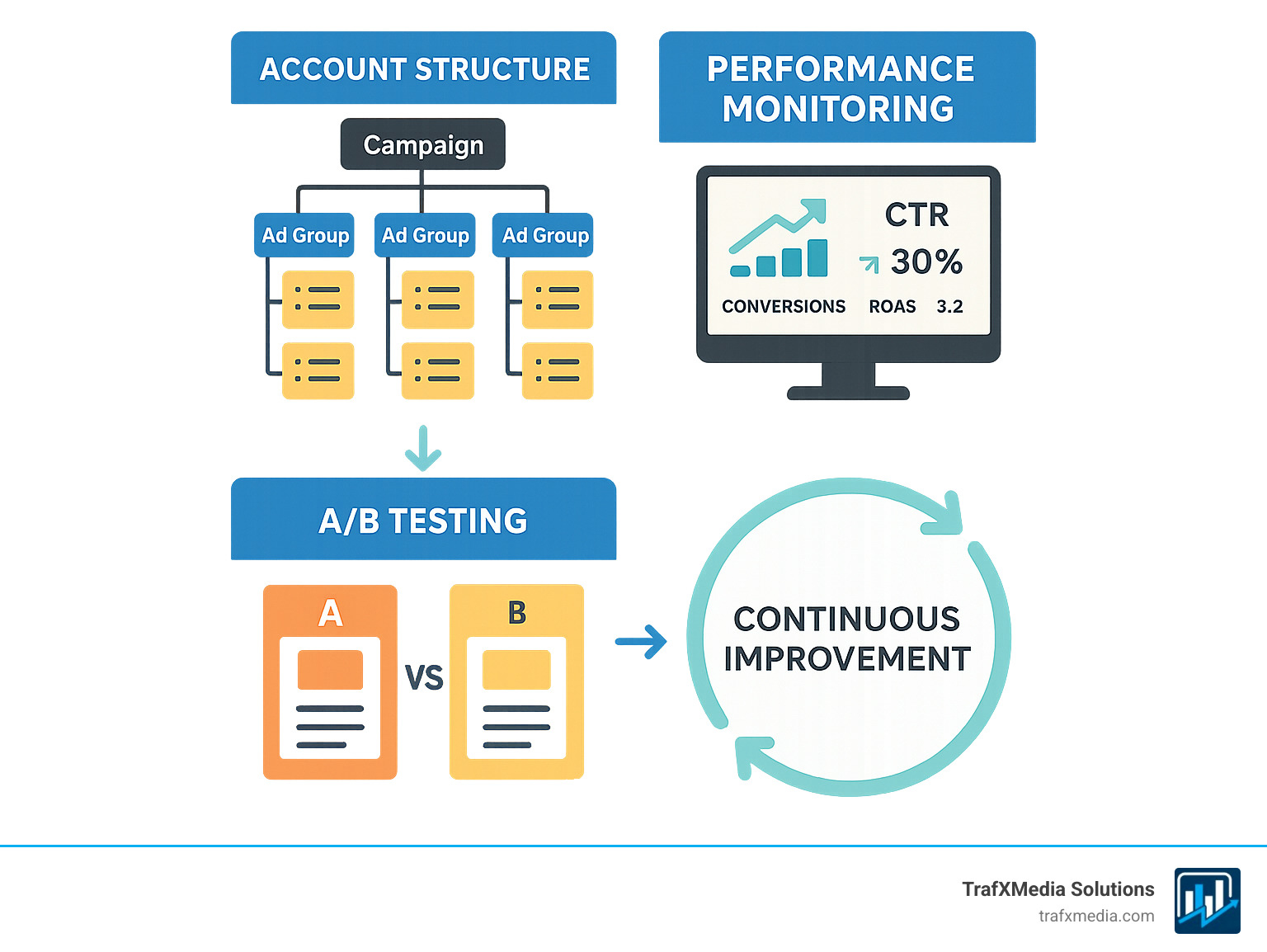
Google ads campaign management is the ongoing process of evaluating ad performance, analyzing keywords, testing copy, and continuously optimizing to maximize your return on investment. Many businesses fail with Google Ads because they treat it as a “set it and forget it” system. However, with competitors constantly optimizing and market conditions shifting, active management is essential to avoid wasting your budget.
Quick Answer for Google Ads Campaign Management:
- Account Structure: Organize campaigns by themes or services.
- Performance Monitoring: Regularly track CTR, CPC, and conversions.
- Continuous Optimization: A/B test ads, refine keywords, and adjust bids.
- Budget Management: Set realistic daily budgets and choose smart bidding strategies.
- Avoid Common Mistakes: Use correct keyword match types and negative keywords.
The standard click-through rate across most industries is five percent, but true success requires constant effort. As one expert notes, “There’s no such thing as ‘passive income’ when running and managing Google Ads campaigns.”
Success in Google Ads comes from structure, measurement, and iteration. I’m Richard Taylor, and I’ve helped globally recognized brands optimize their Google ads campaign management strategies for maximum ROI, combining technical expertise with strategic consulting to deliver measurable results.
Easy Google ads campaign management glossary:
Laying the Foundation: Account Structure and Strategy
Proper organization in Google ads campaign management separates successful campaigns from expensive mistakes. A well-thought-out structure not only makes your account easier to manage but also directly impacts your performance metrics, including your Quality Score. Google Ads uses a clear hierarchy: your Account contains multiple Campaigns, which house Ad Groups, which in turn contain your Keywords and ads. Getting this structure right from the start is crucial for long-term success and scalability.
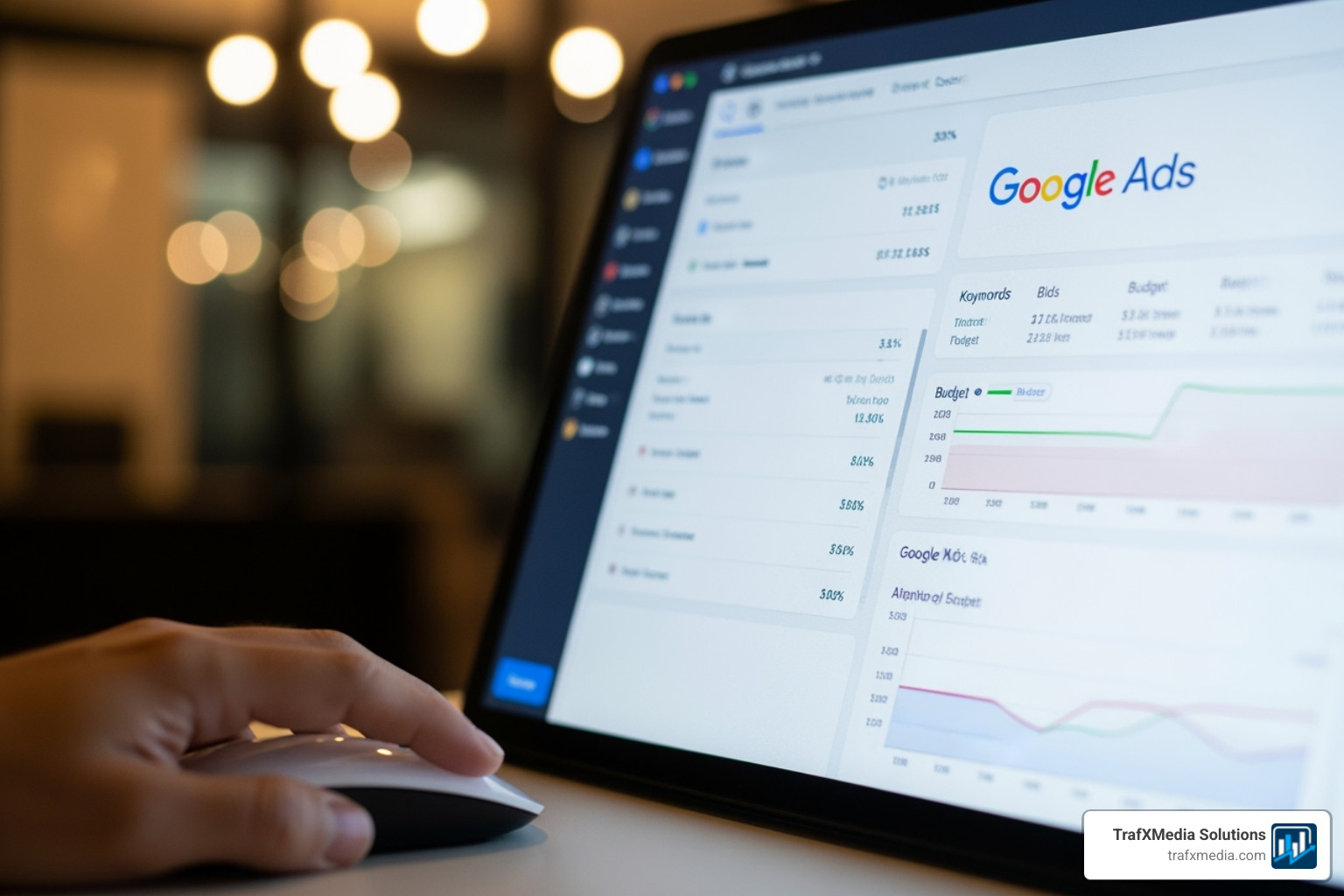
- Account: Your digital headquarters, tied to your email and billing information. This is the top level of the hierarchy.
- Campaigns: Where you make strategic decisions. Each campaign has its own budget, geographic targeting, bidding strategy, and other high-level settings. A key principle is to segment campaigns based on business objectives, product categories, or locations. For example, a San Francisco plumbing business might create separate campaigns for “Emergency Repairs” and “Bathroom Renovations.” This allows them to allocate budget and tailor messaging specifically to the intent and urgency of each service. Common campaign types include:
- Search Campaigns: Text ads that appear on Google Search results pages. Ideal for capturing high-intent users actively searching for your products or services.
- Display Campaigns: Image-based ads that appear across a network of over two million websites, videos, and apps. Best for building brand awareness and remarketing to past website visitors.
- Video Campaigns: Video ads that run on YouTube and other Google Display Network sites. Excellent for storytelling and engaging users visually.
- Shopping Campaigns: Product-focused ads that show an image, title, price, and store name. Essential for e-commerce businesses.
- Performance Max (PMax): An all-in-one, goal-based campaign type that accesses all Google Ads inventory from a single campaign, using AI to find converting customers across all channels.
- Ad Groups: Where you group tightly related keywords with relevant ads. The “Emergency Repairs” campaign could have ad groups for “burst pipes” and “clogged drains,” each with specific keywords and ads custom to that problem. This tight thematic grouping is fundamental to achieving ad relevance.
When your keywords, ads, and landing pages align, Google rewards you with a higher Quality Score, a 1-10 diagnostic rating of your ad quality compared to other advertisers. A higher score leads to better ad positions and lower costs. Quality Score is determined by three main components: Expected Click-Through Rate (CTR) (Google’s prediction of how often your ad will be clicked when shown), Ad Relevance (how closely your ad matches the intent behind a user’s search), and Landing Page Experience (how relevant and useful your landing page is to people who click your ad). For more details, see Google’s guide on About your account organization – Google Ads Help.
What is Google Ads Campaign Management and Why is it Essential?
Launching a campaign is just the beginning. Successful management is an ongoing process of refinement. Competitors, market conditions, and Google’s algorithms are always changing. Without continuous optimization—analyzing keywords, testing ads, and adjusting bids—your campaigns will underperform. ROI maximization requires systematic testing and data analysis to achieve long-term success.
How to Structure Your Campaigns for Success
Structuring your campaigns logically from day one is key. Here’s how:
- Thematic Grouping: Break down your offerings into logical campaigns. Instead of one massive campaign, create separate ones for different product categories or service lines (e.g., a law firm separating “Personal Injury” and “Family Law”). This ensures your budget and messaging are highly targeted.
- Geographic Targeting: If you serve multiple areas, like different San Francisco neighborhoods or even different states, create separate campaigns. This allows you to set location-specific budgets, bids, and ad copy based on local demand, competition, and terminology.
- Budget Allocation: This structure allows for smart budget allocation. You can assign larger budgets to your highest-value services or best-performing locations and smaller test budgets to new offerings or experimental campaigns.
- Match Campaign Goals to Campaign Types: Align your business objective with the right campaign type. If your goal is direct lead generation, a Search campaign is ideal. If you want to build brand awareness, a Display or Video campaign might be more effective.
A well-structured account provides granular control without becoming overwhelming, creating a solid foundation for effective Google ads campaign management.
Measure What Matters: Key Metrics for Performance Tracking
In Google ads campaign management, data tells the story of your success. You can’t optimize what you don’t measure. Tracking the right key performance indicators (KPIs) is like monitoring a campaign’s vital signs, revealing what’s working, what’s not, and where to focus your efforts for improvement. Here are the essential metrics to watch:
- Impressions: The number of times your ad was shown. High impressions with low clicks can indicate your ad isn’t compelling enough or your targeting is too broad.
- Clicks: The number of times your ad was clicked. This is the primary driver of traffic to your website.
- Click-Through Rate (CTR): The percentage of impressions that result in a click (Clicks ÷ Impressions). The standard click-through rate in most industries is five percent, but this varies widely. A low CTR is a major red flag that your ad copy isn’t resonating with your target keywords, which can hurt your Quality Score.
- Cost Per Click (CPC): The average amount you pay for a single click. This is influenced by your bid, Quality Score, and competition. A key goal of optimization is often to lower CPC while maintaining or improving traffic quality.
- Conversions: The number of desired actions taken by users after clicking your ad (e.g., a purchase, form submission, or phone call). This is the ultimate measure of a campaign’s success in generating business.
- Conversion Rate: The percentage of clicks that result in a conversion (Conversions ÷ Clicks). A high conversion rate indicates your ad and landing page are effectively persuading users to act.
- Cost Per Acquisition (CPA): The average cost to generate one conversion (Total Cost ÷ Conversions). This metric is crucial for profitability. You must know your target CPA to determine if your campaigns are sustainable.
- Return On Ad Spend (ROAS): The revenue generated for every dollar spent on advertising (Revenue ÷ Ad Spend). This is the most important metric for e-commerce and any business that can assign a direct monetary value to conversions.
- Impression Share (IS): The percentage of available impressions your ads actually received. This metric reveals missed opportunities. It’s broken down into:
- Search Lost IS (Budget): The percentage of time your ads weren’t shown due to an insufficient budget.
- Search Lost IS (Rank): The percentage of time your ads weren’t shown due to poor Ad Rank (a combination of your bid and Quality Score).
- Search Absolute Top Impression Share: The percentage of your ad impressions that are shown as the very first ad above the organic search results. This is a key metric for advertisers who want to dominate the top position.
The metrics you prioritize should align with your campaign goals:
- Awareness Campaigns: Focus on impressions, reach, and Impression Share.
- Lead Generation Campaigns: Focus on conversions, Conversion Rate, and CPA.
- Sales Campaigns: Focus on ROAS, conversion value, and total sales revenue.
- Website Traffic Campaigns: Focus on clicks, CTR, CPC, and on-site engagement metrics like bounce rate and pages per session.
These numbers are not just statistics; they are actionable signals. By regularly monitoring and understanding these KPIs, you can guide your optimization efforts toward better performance and higher returns on your advertising investment.
The Optimization Loop: Continuous Improvement for Maximum ROI
Effective Google ads campaign management is a relentless pursuit of improvement through data-driven decisions. Perfect campaigns don’t exist at launch; they are built through a continuous optimization loop of testing, measuring, and adjusting. This iterative mindset is what separates high-performing, profitable campaigns from stagnant, money-wasting ones.

Determining Your Budget and Bidding Strategy
Your ideal budget depends on your industry’s competitiveness and business goals. To calculate a starting daily budget, divide your total monthly ad spend by 30.4 (the average number of days in a month). For bidding, you have two main options:
- Manual Bidding: Gives you full control over your maximum cost-per-click (CPC). This is ideal for new campaigns where you need to gather data carefully or for campaigns with very specific, high-value keywords where you want to maintain tight control.
- Automated bidding strategies: Use Google’s machine learning to optimize bids in real-time based on a vast array of signals like device, location, time of day, and user behavior. These strategies require sufficient conversion data (typically 30+ conversions in the last 30 days) to be effective. Popular strategies include:
- Maximize Clicks: Aims to get as many clicks as possible within your budget. Good for driving traffic but can attract lower-quality clicks.
- Target CPA (Cost Per Acquisition): Automatically sets bids to help you get as many conversions as possible at your target CPA. Ideal for lead generation.
- Target ROAS (Return On Ad Spend): Sets bids to maximize conversion value while aiming for a specific return on ad spend. The go-to strategy for e-commerce.
It’s critical to allow automated strategies to complete their “learning period” (typically 1-2 weeks) before making significant judgments or changes. You can also use bid adjustments to bid more or less aggressively for specific devices, locations, or times, and ad scheduling to run ads only during peak business hours.
A/B Testing Ad Copy and Landing Pages
A/B testing, or split testing, is the process of comparing two versions of an ad or landing page to see which one performs better. With the shift to Responsive Search Ads (RSAs), testing has evolved. Instead of testing one static ad against another, you provide multiple headlines and descriptions (assets), and Google’s AI tests different combinations to find the winners. The key is to:
- Test Diverse Themes: Write assets with different angles. For example, test headlines focused on benefits vs. features, or emotional triggers vs. logical appeals.
- Pin Strategically: You can “pin” a headline or description to a specific position if needed (e.g., your brand name in Headline 1), but allow other positions to rotate freely for optimal testing.
- Review Asset Performance: Google provides performance ratings (e.g., “Good,” “Best”) for your assets. Regularly replace “Poor” performing assets with new variations.
Your landing page experience is equally critical. A great ad leading to a poor page will not convert. Ensure your page is fast, mobile-optimized, and maintains “message match”—the promise made in your ad is immediately fulfilled on the landing page. Test different page elements like headlines, calls-to-action (CTAs), forms, and imagery.
Refining Your Targeting with Keywords
Keywords are the bridge connecting your ads with potential customers. Managing them effectively is a core optimization task:
- Keyword Match Types: These control how closely a user’s search query must match your keyword to trigger your ad. Broad match offers the widest reach but can be risky, phrase match provides a balance of reach and control, and exact match gives you the most precision.
- Search Terms Report: This is your most valuable optimization tool. It shows the actual search queries that triggered your ads. Regularly review this report to find new, relevant keywords to add to your campaigns and, just as importantly, to identify irrelevant searches to add as negative keywords.
- Negative Keywords: The key to efficiency. Adding negative keywords prevents your ads from showing for irrelevant terms (e.g., “free,” “jobs,” “DIY”), which saves money, protects your CTR, and improves overall campaign health.
- Dynamic Search Ads (DSAs): For websites with a large inventory or a lot of content, DSAs can be a powerful supplement. They automatically generate headlines and choose landing pages from your site based on the user’s search query, helping to capture long-tail searches you might miss with manual keyword targeting.
Sidestepping Pitfalls: Common Mistakes to Avoid
Even experienced marketers can make costly errors in Google ads campaign management. The platform is complex, and its features are constantly evolving. Fortunately, most mistakes are avoidable once you know what to look for. Steering clear of these common pitfalls will significantly improve your campaign efficiency and profitability.

Common Mistakes in Google Ads Campaign Management and How to Avoid Them
Using the Wrong Keyword Match Types: A frequent error is relying too heavily on broad match without a robust negative keyword list. This can cause your ads to show for completely irrelevant searches, wasting your budget on clicks that will never convert. Solution: Start with phrase and exact match for your core keywords to maintain control. Use broad match strategically, paired with smart bidding and a diligent review of the search terms report.
Ignoring Negative Keywords: This is one of the most expensive mistakes. Failing to actively add negative keywords means you are continuously paying for clicks from users who have no intention of buying. Solution: Make reviewing your search terms report a weekly ritual. Identify and exclude irrelevant search queries at the ad group, campaign, or account level using negative keyword lists.
Poor Ad Copy: Generic, uninspired ad copy fails to capture attention or stand out from competitors. If your ad doesn’t speak directly to the user’s problem and offer a clear solution, they will click on someone else’s. Solution: Write compelling copy that highlights your unique value proposition (UVP), includes a strong call-to-action (CTA), and mirrors the language of your target keywords.
Neglecting Landing Page Optimization: A great ad is wasted if it leads to a slow, confusing, or mobile-unfriendly landing page. A poor user experience will kill your conversion rates and lower your Quality Score. Solution: Ensure your landing page has a strong “message match” with your ad, loads quickly, is easy to steer on mobile devices, and makes it simple for the user to convert.
Ignoring Mobile Users: With the majority of searches happening on mobile devices, failing to optimize for this traffic is a critical oversight. Ads and landing pages that look great on a desktop may be unusable on a smartphone. Solution: Use mobile-specific bid adjustments, create mobile-preferred ads if necessary, and relentlessly test your landing page experience on different mobile devices to ensure a seamless path to conversion.
Setting and Forgetting Campaigns: Google Ads is not a passive platform. Performance will inevitably decline if left unmanaged as competitors adapt, search trends shift, and your ads become stale. Solution: Commit to a regular management schedule. Check in daily for major issues and perform a deeper analysis weekly to optimize bids, keywords, and ad copy based on performance data.
Not Using Ad Extensions: Ad extensions are free to use and are a proven way to improve performance. They provide more information, make your ad larger, and give users more reasons to click. Solution: Implement all relevant ad extensions, including Sitelinks, Callouts, Structured Snippets, Image Extensions, and Lead Form Extensions. They directly impact your Ad Rank, leading to higher CTRs and better ad positions.
By avoiding these common pitfalls, you can build a more efficient and profitable Google ads campaign management process.
Leveraging Google’s Toolkit for Efficient Management
Google provides a powerful suite of tools designed to make Google ads campaign management more streamlined, strategic, and data-driven. Mastering these tools allows you to automate routine tasks, uncover deep insights, and spend less time on manual adjustments and more time on high-level strategy that drives growth.
Streamlining with Google Ads Manager Accounts (MCC)
A Google Ads Manager Account (MCC) is an essential hub for anyone managing multiple Google Ads accounts. It provides a single dashboard to oversee all linked accounts, making it indispensable for agencies, freelance managers, or businesses with multiple brands or locations. Key benefits include:
- Centralized Dashboard: View performance data, manage campaigns, and access all accounts from one login.
- Multi-Account Management: Easily steer between accounts and make bulk changes across multiple accounts simultaneously.
- Consolidated Billing: Streamline invoicing and payments for multiple accounts.
- Access Control: Grant and manage different permission levels for team members, ensuring secure collaboration.
An MCC is especially useful for San Francisco businesses managing separate campaigns for different service areas. You can Learn more about Google Ads Manager Accounts directly from Google. Fun fact: You can use the same email address for up to 20 Google Ads accounts.
Mastering Bulk Edits with Google Ads Editor
For serious campaign management, Google Ads Editor is a non-negotiable power tool. It’s a free, downloadable desktop application that allows you to work offline and make bulk changes to your campaigns quickly and efficiently. Key uses include:
- Bulk Changes: Edit bids, budgets, keywords, and ad copy across multiple campaigns or ad groups at once.
- Offline Work: Download your account, make changes without an internet connection, and then upload them when you’re ready.
- Copying and Pasting: Easily duplicate campaigns, ad groups, or ads to scale up your efforts or create new test variations.
Strategic Planning with Google’s Tools
Beyond day-to-day management, Google offers tools for strategic planning:
- Keyword Planner: Research new keywords, get historical metrics, and forecast future performance. It’s the starting point for any new search campaign.
- Performance Planner: Use your campaign’s historical data to explore how changes to budgets and bids could impact future performance, helping you set realistic goals and allocate resources effectively.
Using Built-in Optimization Features
Google Ads also has built-in features that use machine learning to improve efficiency:
- Recommendations Page: Provides personalized suggestions to improve performance. Always evaluate these critically—never blindly accept them—but they can be a great source of ideas for new keywords or bid adjustments.
- Insights Page: Offers a view of market trends, seasonal shifts, and emerging search behaviors relevant to your business.
- Automated Rules: Set up rules to trigger automatic actions, like pausing poor-performing ads or increasing bids on high-converting keywords when certain conditions are met.
Using these tools transforms Google ads campaign management from a reactive task list into a proactive, strategic operation, freeing you up to focus on what matters most: growing your business.
Frequently Asked Questions about Google Ads Management
Here are straight, no-fluff answers to the most common questions we hear about Google ads campaign management.
How do I run a successful Google Ads campaign?
There is no magic formula or secret button. Success comes from a disciplined commitment to four core principles:
- Continuous Testing: Always be experimenting. Test new ad copy, different landing pages, bidding strategies, and keyword variations to find what works best for your specific audience and goals.
- Monitoring Key Metrics: Religiously track KPIs like CTR, CPC, Conversion Rate, and CPA/ROAS. These numbers tell you the story of your performance and guide your decisions.
- Ongoing Optimization: Constantly refine your campaigns based on performance data. This means pruning bad keywords, reallocating budget to winning campaigns, and refreshing ad creative.
- Data-Driven Decisions: Let the numbers, not gut feelings or assumptions, guide your strategy. Every significant change should be backed by data.
Crucially, be patient. Google Ads campaigns have a “learning phase” of 2-4 weeks, especially when using automated bidding. Avoid making drastic changes during this time to allow the algorithm to gather enough data to optimize effectively.
What is a good daily budget for Google Ads?
There’s no one-size-fits-all answer. Your ideal budget depends on your industry competition, geographic target, and business goals. A competitive industry in a major city will require a larger budget than a niche service in a small town. Instead of picking a random number, you can estimate a starting point. Use the Keyword Planner to find the average CPC for your main keywords. If the average CPC is $3 and you want to get at least 10 clicks a day to gather data, you’d need a starting budget of at least $30/day. Think of this initial spend as an investment in data. You’re paying to learn which keywords convert and what ad copy resonates. Once you have a clear path to profitability (i.e., a positive CPA or ROAS), you can confidently scale your budget.
How often should I check my Google Ads campaigns?
Finding the right balance between over-managing and neglect is key. Here’s a practical schedule:
- Daily Checks (5-10 minutes): A quick scan for critical issues. Check for ad disapprovals, sudden spikes or drops in spend, and ensure campaigns are running correctly. This is about preventing disasters, not optimization.
- Weekly Analysis (1-2 hours): This is your dedicated optimization time. Dive deep into performance trends. Your weekly checklist should include: reviewing the search terms report for new keywords and negatives, analyzing ad copy performance (and pausing losers), checking budget pacing, and reviewing performance by device, location, and audience segments.
Avoid the temptation to make changes too frequently. The Google Ads algorithm needs time and data to learn. Constantly tweaking your campaigns can reset this learning process and prevent you from ever achieving stable performance.
What is the difference between Google Ads and SEO?
Both are methods to get traffic from search engines, but they are fundamentally different. Google Ads is a paid advertising platform where you pay for clicks (PPC – Pay-Per-Click). It delivers immediate visibility and traffic. SEO (Search Engine Optimization) is the organic practice of improving your website to rank higher in the natural, unpaid search results. SEO is a long-term strategy that builds authority over time and can deliver sustainable, “free” traffic. The best marketing strategies use both: Google Ads for immediate results and testing, and SEO for long-term, foundational growth.
How long does it take to see results from Google Ads?
This is a two-part answer. You can start seeing traffic and clicks almost immediately after your campaign is approved and launched. However, seeing meaningful business results—like a consistent, profitable stream of leads or sales—takes longer. You need to account for the initial learning phase, the time it takes to gather enough data to make smart optimizations, and the process of testing and refining. A realistic timeline is 2-3 months to get a campaign fully optimized and understand its true potential for profitability.
Conclusion: Conquer Your San Francisco Campaigns
Mastering Google ads campaign management is an ongoing commitment, not a one-time task. Success hinges on a strategic account structure, diligent monitoring of key metrics, and a cycle of iterative optimization. Thriving businesses accept this process, avoiding common errors and continuously refining their approach to stay ahead.
For San Francisco businesses, the competitive landscape demands a higher level of strategy. Your campaigns must resonate with local customers and cut through the digital noise. This is where local expertise provides a critical advantage, turning standard campaigns into powerful revenue drivers.
At TrafXMedia Solutions, we specialize in helping San Francisco businesses steer this complex environment. Our approach combines proven Google ads campaign management techniques with deep local knowledge to ensure your advertising dollars deliver maximum impact. We partner with you to transform your Google Ads from an expense into a profit center.
Ready to lift your campaigns? Let’s work together to achieve your goals.